Have you ever been playing your favorite game for hours and just thought, “I wish I had the chops to make my own”? Sure, it’s easy to get excited about neat ideas, but you can also very quickly run into a wall of scary tutorials and jargon. Most novices are confused even before they have written their first line of logic or designed their first level.
So that’s what makes learning the modern way to make games online such a total game changer for aspiring game makers. Modern web-based tools and AI systems such as Astrocade allow this to happen as you create mechanics, levels, and logic from text prompts instead of becoming stuck in technical bottlenecks. In this all-new noob guide, we’ll take you all in by the hand and guide you through everything you need to know to start making games right in your web browser.
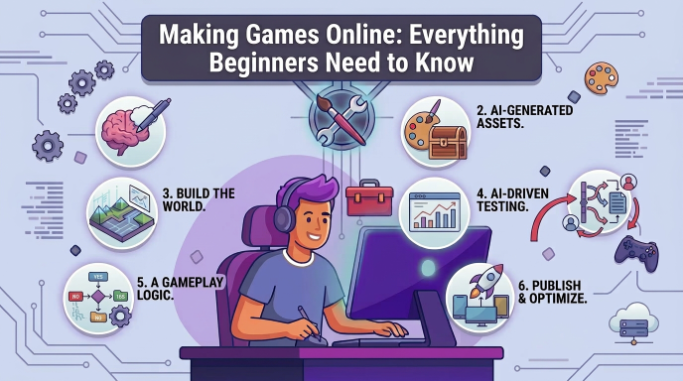
Choose Right Engine
Selecting the appropriate building platform sets the stage for your entire journey. Web applications allow you to start designing right away without having to install heavy software or worry about complex folder structures. As you begin to make games online, search for systems with simple visual interface, clean node systems, or conversational AI prompts.
Selecting a lightweight, easy-to-use engine will save you a lot of potential technical headaches early on. Choose a tool that has drag-and-drop mechanics or automatic level generation so you can get immediate results, including some joy. Discovering software at the right level for your current technical abilities means you can keep up your momentum from day one.
Learn Basic Logic
Knowing how to play the game is the very foundation for knowing what makes any interactive experience tick. With traditional tools, you’d have to script, but now with visual block nodes, or natural language prompts, you create rules. You can easily specify how high a character jumps, what occurs when you pick up items, how enemies move in response to you on the screen, and so on.
For logic-heavy games, state-machine-style representations using state charts, or Deterministic Finite Automata, can simplify character behaviors, puzzle logic, and state transitions. If you break your game down into clear triggers and actions, it’s much easier to troubleshoot when “unexpected” bugs crop up. Learn the most basic triggers first before moving onto more complex rules on your levels.
Design Fun Levels
The design of levels is where your world shines and becomes real for players. Begin with rough room layouts and platforming flow by the use of visual grid sheets or pre-made asset packs. The positioning of obstacles, collectibles, and checkpoints subtly guides the player down a natural path in your level.
Gradually ramp up the challenge in your levels to keep them engaged, but not intimidated. Introduce obstacles individually, so players learn the controls for movement well before they confront a greater number of hazards. A well-designed level layout turns simple movements into a compelling and satisfying journey.
Test Core Gameplay
Running playtests often helps you fine-tune controls and level difficulty. Test your movement speed, collision boundaries, and camera angles in your playable build directly in your web browser. Being in your world yourself will immediately show you the odd jump distances or the levels that are instantly unfair.
Having friends or online community members provide quick feedback provides an invaluable outside perspective. Note where playtesters are getting stuck or confused in their very first playthrough. Refining your controls and jump physics from real feedback turns a mediocre prototype into a stellar project.
Publish Your Build
Showing the world your finished product is the most satisfying part of the entire endeavor. Publishing to the web is easy to compile, resulting in a link you can play right away, hosted fully on the cloud. With a few clicks, you can distribute your unique link on social media, community forums, or even your own portfolio.
The immediate web export also allows players to experience your creation on desktop and mobile without the need to download installation files. Wide exposure allows your work to be seen by a real audience and allows you to quickly build momentum. Finishing and releasing your first web-based build gives you real confidence for that next project of yours.
Conclusion
Setting off on the path of developing games online has never been easier or more lucrative for amateurs. Because you use easy-to-access web tools, learn basic visual logic, and concentrate on fun level design, you avoid the technical roadblocks that previously kept creative people stuck. Start small so you can gain confidence and get some hands-on experience with every project you finish.
If you enjoy logic-based mechanics or language puzzles, making a game like Escape from Dogkov, a state-driven word puzzle game where particular letter inputs take you between states, is a great way to think about structured system logic. Keep in mind all of them started out with a simple prototype and a desire to learn. Just focus on making some fun core mechanics, test your builds a lot, and don’t be scared to show people your work. Take what you have learned today, open your favorite online builder, and begin transforming your one-of-a-kind game ideas into reality right now.
See also: From Boardrooms to Auditoriums: Where Draper Projector Lifts Shine in Business
FAQs
Do I need to learn traditional programming languages to make games online?
No, modern web development tools involve visual scripting blocks, node-based networks, or AI text prompts to define logic, enabling absolute novices to create full projects without ever writing traditional code.
Can I build online games using just a web browser?
Several modern platforms are entirely web-based (e.g web browsers such as Chrome, Edge, Firefox etc.) and compile, render assets, and host all in the cloud.
What type of game is easiest for a beginner to start with?
Basic 2D platformers, endless runners or puzzle games on a single screen are perfect for starters as they have simple movement rules, basic collision detection, and obvious win/loss state.
How do I share my online game with my friends?
Most engines that run in the cloud will generate a direct shareable URL once you publish your project, which you can then share with anyone so they can open the link and play it instantly on their computer or phone without needing to install additional software.
Are browser-based game engines free to use?
Many web creation platforms have free plans with core features, basic asset libraries, and hosting capabilities, allowing new creators to get started without any barriers.